facebook
Upqor Education Hub presents School360 – a complete digital backbone for schools
🏫 Paperless school operations β€’ real-time visibility β€’ mobile engagement

Smart School ERP & Mobile App for future-ready school management.

A complete digital operating system for principals, trustees, administrators, teachers, students and parents β€” built to reduce manual work and give every stakeholder clear visibility.

Based on 8+ years of ground-level learning from school projects, this ERP is designed for real school conditions: manual registers, attendance gaps, result preparation, asset tracking, maintenance requests, communication, training and digital learning support.
1Unified school data layer
3Panels: School, Student, Mobile
30+Operational modules
24/7Digital access & records
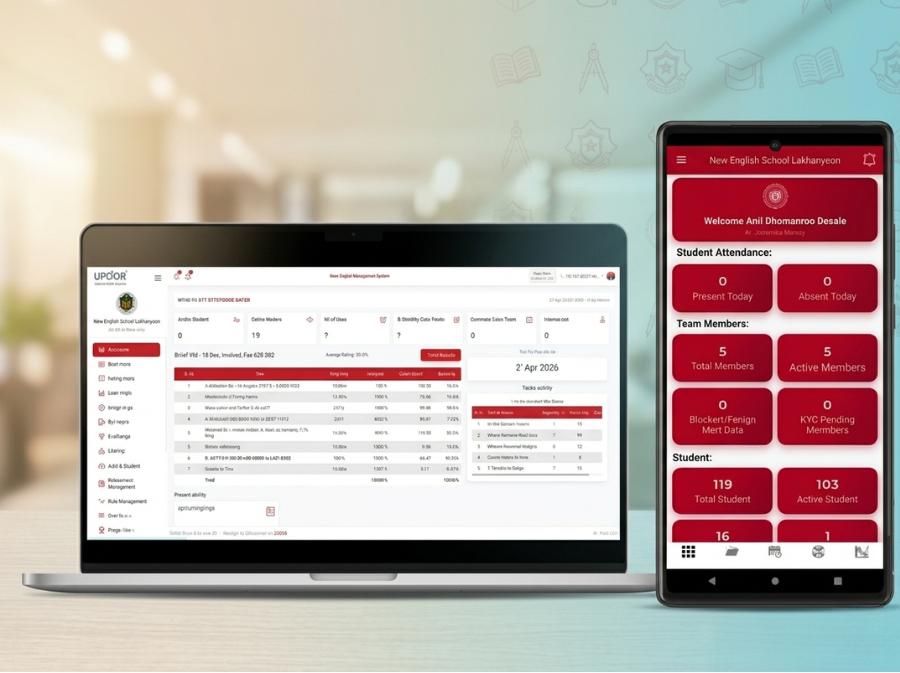
Smart School ERP Dashboard and Mobile App
ERP module map

Everything a school needs to manage daily operations digitally.

The solution brings school administration, academic records, digital learning, project management, assets and support into one connected system.

🏫

School Profile

One master record for school details.

  • School identity & basic data
  • Micro public website
  • School calendar & holidays
πŸ‘©β€πŸ«

Team Profile

Complete teacher and staff records.

  • Staff list and roles
  • Teacher attendance
  • KRA/KPI tracking
πŸŽ“

Student Records

Digital student lifecycle management.

  • Student profile and history
  • New registration
  • Promotion & leaving certificate
βœ…

Attendance

Track daily student and teacher attendance.

  • Class-wise attendance
  • Attendance records
  • Dashboard visibility
πŸ“Š

Results & Academics

Manage academic progress digitally.

  • Student results
  • Academic records
  • Interactive syllabus content
πŸ’¬

Communication

Improve school-parent-student communication.

  • Email & SMS templates
  • Contact lists
  • PTM and mentorship updates
πŸ’³

Fees Management

Digitize student fee records and visibility.

  • Fee records
  • Payment tracking ready
  • Student-wise history
πŸ› 

Assets & Maintenance

Keep school assets and issues traceable.

  • Asset register
  • Maintenance requests
  • Helpdesk tickets
πŸ“š

e-Vidyalaya

Learning, guidance and digital exposure.

  • Training modules
  • Career guidance
  • Mentoring & skill development
πŸ†

Competitions

Manage student competitions and activities.

  • Student participation
  • Progress and achievements
  • Rating and review
πŸ“¦

Project & Orders

Manage school needs and project support.

  • My projects
  • Specific requests
  • Order management
πŸ”

User Rights

Role-based access for safe operations.

  • Admin rights
  • Teacher access
  • Student/parent access
User panels

Separate experience for school management, teachers, students and parents.

The ERP is not only an admin tool. It connects every user with the information and action they need.

School Admin Panel

For principals, trustees and administrators

  • Dashboard with live KRA/KPI index
  • School profile, staff, students and reports
  • Attendance, results, certificates and fees
  • Assets, maintenance, requests and projects
  • User rights, settings and school calendar
Teacher Panel

For teachers and school staff

  • Student attendance and academic records
  • Training and e-Vidyalaya access
  • PTM, mentorship and communication
  • Competitions and student progress updates
  • Helpdesk tickets and support requests
Student / Parent App

For students and parents

  • My profile and school updates
  • Attendance, results and student history
  • Fees information and certificates
  • Training, guidance and competitions
  • FAQs, policies and helpdesk tickets
Implementation journey

A practical rollout designed for real schools.

Upqor Education Hub can onboard schools step by step so the ERP becomes useful from the first phase itself.

1

Discovery

Understand current registers, records, users, school size and priority problems.

2

Data Setup

Create school profile, team profile, student list, user rights and sample records.

3

Training

Train admin team and teachers through practical daily-use scenarios.

4

Go Live

Start attendance, results, communication, fees, assets and maintenance workflows.

5

Support

Provide helpdesk, improvements, reports and long-term ERP support.

Problems solved

Before School360 ERP

βœ• Manual registers and repeated paperwork for teachers.
βœ• Difficult to see student, teacher and asset data in one place.
βœ• Attendance, results, certificates and reports consume too much time.
βœ• School needs, maintenance and project requests are not structured.
βœ• Parents and students receive limited digital visibility.
Benefits delivered

After School360 ERP

βœ“ Paperless operating system for school administration.
βœ“ One data layer for school, staff, students, parents and management.
βœ“ Faster records, attendance, results, certificates and reports.
βœ“ Traceable requests, assets, maintenance tickets and project updates.
βœ“ Mobile-first engagement for teachers, students and parents.
Quick infographic summary

One ERP. Three layers. Clear outcomes.

1. Manage

School profile, team, students, attendance, results, fees, certificates, reports and user rights.

2. Engage

Mobile app, communication, PTM, mentorship, e-Vidyalaya, training, competitions and guidance.

3. Support

Assets, maintenance requests, helpdesk tickets, projects, orders, reporting and continuous improvement.

Request more information

Open this page when someone clicks β€œMore Information” on Service 01.

This detail page is ready to connect from the first service box on your main website. It explains the ERP clearly for principals, trustees, administrators, teachers, students and parents.

Suggested link from main page: Smart School ERP & Mobile App β†’ More Information β†’ this page.